

Simulation condition-specific parameters
Sometimes, model parameters should be estimated to different values depending on the simulation condition. For example, c1 may have one value in :cond1 and another in :cond2.
This is handled via condition-specific parameters defined using PEtabCondition. This tutorial shows how to set up such parameters. It assumes familiarity with simulation conditions; see Simulation conditions. As a running example, we use the Michaelis–Menten model from the starting tutorial.
using Catalyst, PEtab

rn = @reaction_network begin
    @parameters S0 c3=3.0
    @species begin
        S(t) = S0
        E(t) = 50.0
        SE(t) = 0.0
        P(t) = 0.0
    end
    @observables begin
        obs1 ~ S + E
        obs2 ~ P
    end
    c1, S + E --> SE
    c2, SE --> S + E
    c3, SE --> P + E
end

@parameters sigma
petab_obs1 = PEtabObservable(:petab_obs1, :obs1, 3.0)
petab_obs2 = PEtabObservable(:petab_obs2, :obs2, sigma)
observables = [petab_obs1, petab_obs2]

p_c2 = PEtabParameter(:c2)
p_S0 = PEtabParameter(:S0)
p_sigma = PEtabParameter(:sigma)
Specifying condition-specific parameters
Condition-specific parameters are handled by (i) defining separate PEtabParameters and (ii) mapping them to the same model parameter in each simulation condition. For instance, assume the model parameter c1 should take the value of c1_cond1 in :cond1 and c1_cond2 in :cond2. First, define the parameters:
p_c1_cond1 = PEtabParameter(:c1_cond1; value = 1.0)
p_c1_cond2 = PEtabParameter(:c1_cond2; value = 2.0)
pest = [p_c1_cond1, p_c1_cond2, p_S0, p_c2, p_sigma]
Followed by assigning them to model parameter c1:
@parameters c1_cond1 c1_cond2
cond1 = PEtabCondition(:cond1, :c1 => c1_cond1)
cond2 = PEtabCondition(:cond2, :c1 => c1_cond2)
simulation_conditions = [cond1, cond2]
2-element Vector{PEtabCondition}:
PEtabCondition cond1: c1 => c1_cond1
PEtabCondition cond2: c1 => c1_cond2Finally, assign each measurement row to a simulation condition via simulation_id:
using DataFrames
measurements = DataFrame(
    simulation_id = ["cond1", "cond1", "cond2", "cond2"],
    obs_id        = ["petab_obs2", "petab_obs1", "petab_obs2", "petab_obs1"],
    time          = [1.0, 10.0, 1.0, 20.0],
    measurement   = [0.7, 0.1, 1.0, 1.5],
)
A PEtabModel accounting for condition specific parameters can then be created by passing the conditions via the simulation_conditions keyword:
model = PEtabModel(
    rn, observables, measurements, pest;
    simulation_conditions = simulation_conditions
)
petab_prob = PEtabODEProblem(model)
With this setup, c1 is given by c1_cond1 when simulating :cond1 and by c1_cond2 when simulating :cond2 (with both c1_cond1 and c1_cond2 being estimated). The different c1 values across conditions can been seen from plotting the model:
using Plots
x = get_x(petab_prob)
sol_cond1 = get_odesol(x, petab_prob; condition = :cond1)
sol_cond2 = get_odesol(x, petab_prob; condition = :cond2)
p1 = plot(sol_cond1, title = "cond1: c1 = 1.0")
p2 = plot(sol_cond2, title = "cond2: c1 = 2.0")
plot(p1, p2)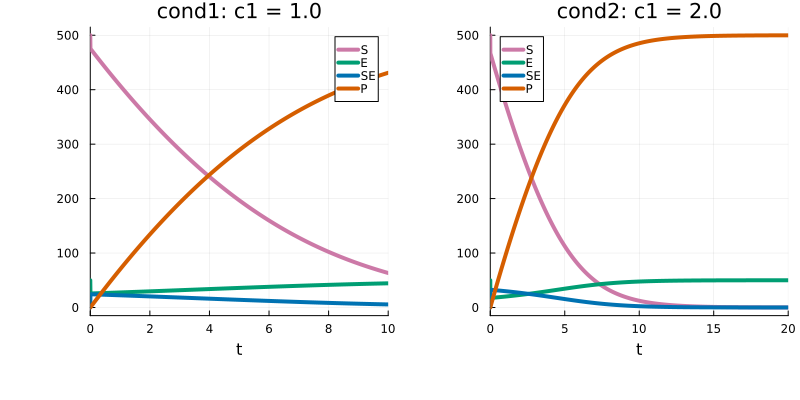
Additional possible configurations
Above, the PEtabParameters [c1_cond1, c1_cond2] map to a single model parameter. PEtab parameters can also map to multiple model parameters. For example:
@parameters c1_cond1
cond1 = PEtabCondition(:cond1, :c1 => c1_cond1, :c2 => c1_cond1)
The mapping can also be any valid Julia expression using standard functions such as sin, exp, and cos. For example:
@parameters c1_cond1
cond1 = PEtabCondition(:cond1, :c1 => 1.0 + sin(c1_cond1))
cond1 = PEtabCondition(:cond1, :c1 => "1.0 + sin(c1_cond1)")
Expressions can here be provided as a Symbolics expression (first above, recommended) or as a String.
Performance tip
For models with many condition-specific parameters, runtime performance may improve by setting split_over_conditions=true when building the PEtabODEProblem ((PEtab.jl tries to determine when to do this automatically, but it is a hard problem) ). For more information, see this example.