Events/callbacks
Events/callbacks apply discrete changes during ODE simulation by updating states and/or parameters. They are often used to model experimental interventions, such as dosing or a media change. In PEtab.jl, events are specified with PEtabEvent:
PEtab.PEtabEvent Type
PEtabEvent(condition, assignments::Pair...; condition_ids = [:all])Model event triggered when condition transitions from false to true, applying the updates in assignments.
For examples, see the online package documentation.
Arguments
condition: Boolean expression that triggers the event on afalse→truetransition. For example,t == 3.0triggers att = 3.0;S > 2.0triggers when speciesScrosses2.0from below.assignments: One or more updates of the formtarget_id => target_value.target_id: Entity to update (Symbol,String, or SymbolicsNum). May be a model state id or model parameter id.target_value: Value/expression assigned totarget_id(Real,String, or SymbolicsNum). May use standard Julia functions (e.g. exp, log, sin, cos) and reference model states/parameters.
Keyword Arguments
condition_ids: Simulation condition identifiers (as declared byPEtabCondition) for which the event applies. If[:all](default), the event applies to all conditions.
Event evaluation order
target_value expressions are evaluated at the condition trigger point using pre-event model values, meaning all assignments are applied simultaneously (updates do not see each other’s new values). If a time-triggered event fires at the same time as a measurement, the model observable is evaluated after applying the event.
This tutorial shows how to specify both time-triggered and state-triggered events (e.g. when a state crosses a threshold), as well as how to assign condition specific events. As a running example, we use the Michaelis–Menten model from the starting tutorial.
using Catalyst, DataFrames, PEtab

rn = @reaction_network begin
    @parameters S0 c3=1.0
    @species begin
        S(t) = S0
        E(t) = 1.0
        SE(t) = 0.0
        P(t) = 0.0
    end
    @observables begin
        obs1 ~ S + E
        obs2 ~ P
    end
    c1, S + E --> SE
    c2, SE --> S + E
    c3, SE --> P + E
end

@parameters sigma
petab_obs1 = PEtabObservable(:petab_obs1, :obs1, 3.0)
petab_obs2 = PEtabObservable(:petab_obs2, :obs2, sigma)
observables = [petab_obs1, petab_obs2]

# Value are set for better plots
p_c1 = PEtabParameter(:c1; value = 1.0)
p_c2 = PEtabParameter(:c2; value = 2.0)
p_S0 = PEtabParameter(:S0; value = 5.0)
p_sigma = PEtabParameter(:sigma)
pest = [p_c1, p_c2, p_S0, p_sigma]

measurements = DataFrame(
    obs_id=["obs_p", "obs_sum", "obs_p", "obs_sum"],
    time=[1.0, 10.0, 1.0, 20.0],
    measurement=[0.7, 0.1, 1.0, 1.5]
)
Why PEtabEvent?
While events/callbacks can also be encoded directly in a Catalyst ReactionSystem or an ODESystem, using PEtabEvent is needed to ensure correct evaluation of the objective function and its gradient [8], and it often also improves performance.
Time-triggered events
Time-triggered events fire at a specified trigger time. The trigger time can be a constant (e.g. t == 2.0) or a model parameter (e.g. t == c2). For example, to trigger an event at t = 2.0 that sets S => S + 2.0:
t = default_t()
@unpack S = rn
event = PEtabEvent(t == 2.0, :S => S + 2)
PEtabEvent when t == 2.0: S => 2 + S(t)A PEtabModel accounting for this event can be created by passing the event via the events keyword:
model = PEtabModel(rn, observables, measurements, pest; events = event)
petab_prob = PEtabODEProblem(model)
From simulating the model, we see the jump in S at t = 2.0:
using Plots
x = get_x(petab_prob)
sol = get_odesol(x, petab_prob)
plot(sol; linewidth = 2.0)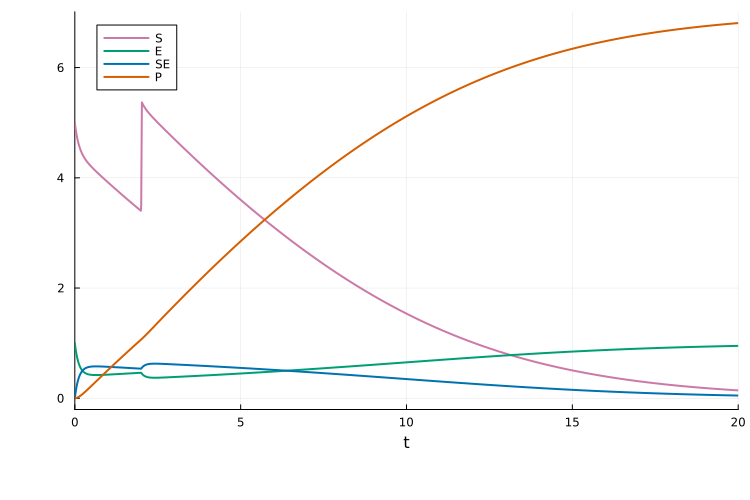
The trigger time can also be a model parameter (which can be estimated). For example, to set c1 => 2.0 when t == c2:
@unpack c2 = rn
event = PEtabEvent(t == c2, :c1 => 2.0)
model = PEtabModel(rn, observables, measurements, pest; events = event)
petab_prob = PEtabODEProblem(model)
x = get_x(petab_prob)
sol = get_odesol(x, petab_prob)
plot(sol; linewidth = 2.0)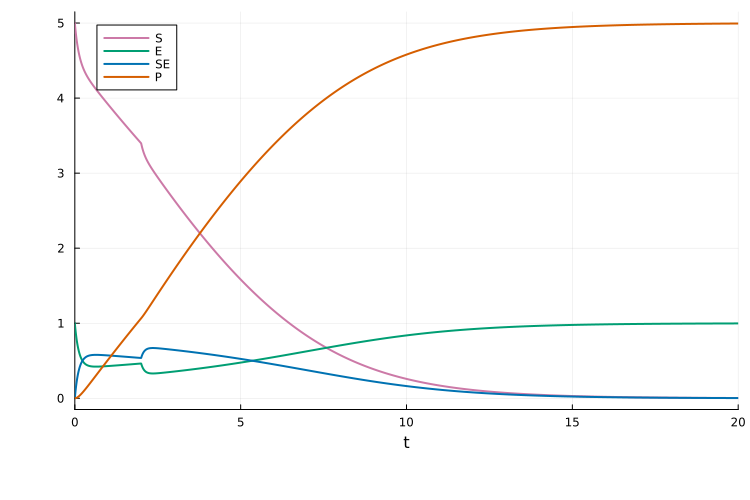
State-triggered events
State-triggered events fire when the PEtabEvent event condition transitions from false to true. For example, to set S => 1.0 when the state S reaches 0.2:
@unpack S = rn
event = PEtabEvent(S == 0.2, :S => 1.0)
PEtabEvent when S(t) == 0.2: S => 1.0Plotting the solution, we see the jump when S = 0.2:
model = PEtabModel(rn, observables, measurements, pest; events = event)
petab_prob = PEtabODEProblem(model)
x = get_x(petab_prob)
sol = get_odesol(x, petab_prob)
plot(sol; linewidth = 2.0)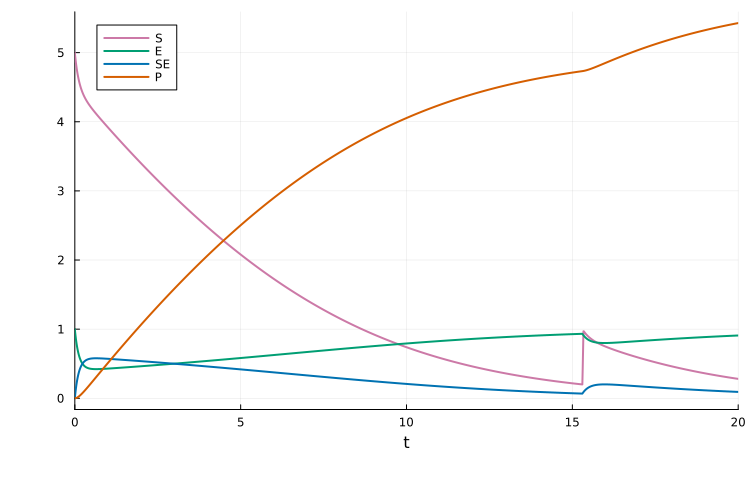
Because events trigger on a false → true transition, event directionality can be controlled using inequalities. For example, if S starts above 0.2, then S > 0.2 is already true at t0 and the event will not trigger:
event = PEtabEvent(S > 0.2, :S => 1.0)
model = PEtabModel(rn, observables, measurements, pest; events = event)
petab_prob = PEtabODEProblem(model)
sol = get_odesol(x, petab_prob)
plot(sol; linewidth = 2.0)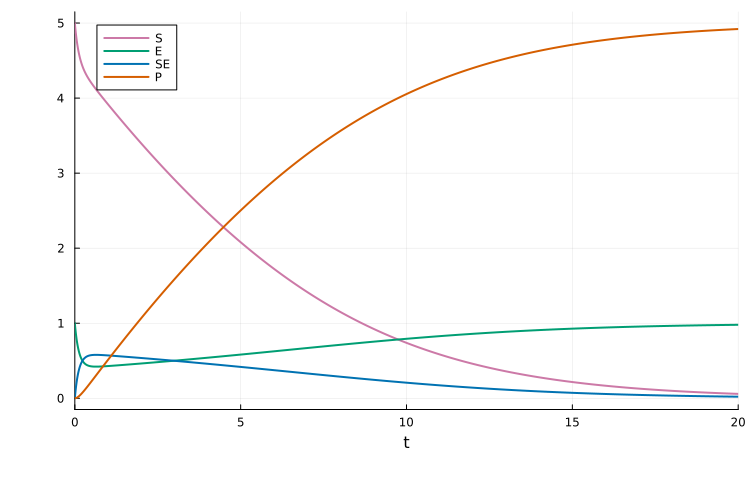
Meanwhile, with condition S < 0.2 the event triggers when S goes below 0.2:
event = PEtabEvent(S < 0.2, :S => S + 1)
model = PEtabModel(rn, observables, measurements, pest; events = event)
petab_prob = PEtabODEProblem(model)
sol = get_odesol(x, petab_prob)
plot(sol; linewidth = 2.0)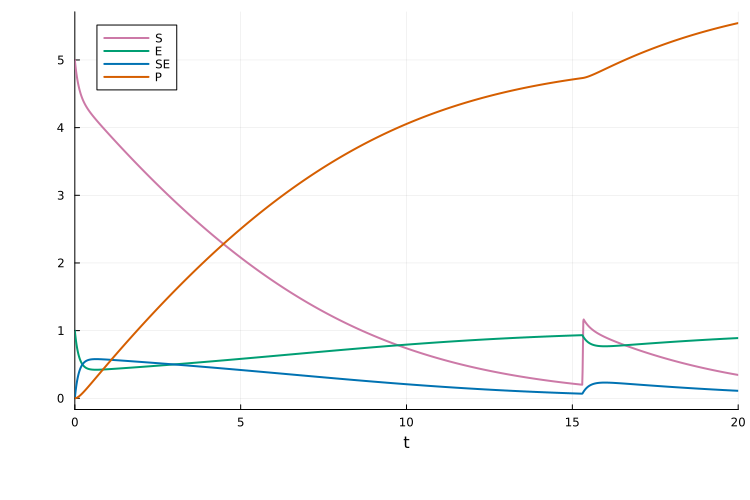
Multiple event targets
If an event updates multiple states and/or parameters, provide multiple assignments. For example, to set both S => S + 2 and c1 => 2.0 when S < 0.2:
@unpack S = rn
event = PEtabEvent(S < 0.2, :S => S + 2, :c1 => 2.0)
PEtabEvent when S(t) < 0.2: S => 2 + S(t), c1 => 2.0The event is then provided as usual to PEtabModel:
model = PEtabModel(rn, observables, measurements, pest; events = event)
petab_prob = PEtabODEProblem(model)
x = get_x(petab_prob)
sol = get_odesol(x, petab_prob)
plot(sol; linewidth = 2.0)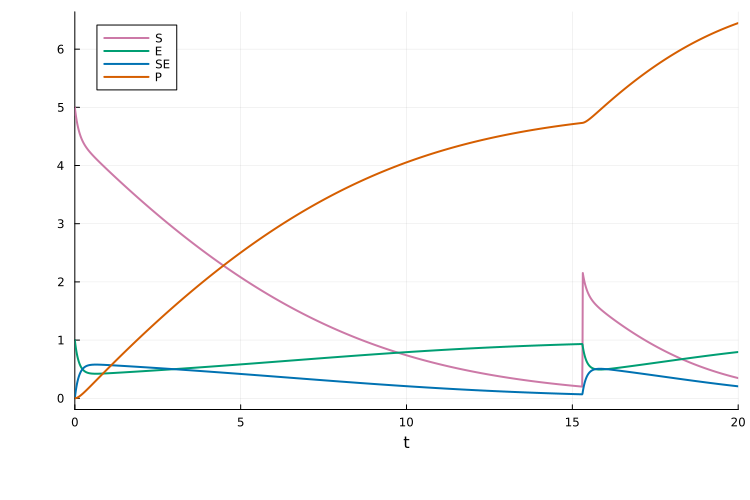
Multiple events
If a model has multiple events, pass them as a Vector{PEtabEvent}. For example, assume event1 trigger when S < 0.2 setting S => S + 2, and event2 trigger at t = 1.5 setting c1 => 2.0:
t = default_t()
@unpack S = rn
event1 = PEtabEvent(S < 0.2, :S => S + 2)
event2 = PEtabEvent(t == 1.5, :c1 => 2.0)
events = [event1, event2]
The, the events can be provided as usual via the events keyword to PEtabModel:
model = PEtabModel(rn, observables, measurements, pest; events = events)
petab_prob = PEtabODEProblem(model)
x = get_x(petab_prob)
sol = get_odesol(x, petab_prob)
plot(sol; linewidth = 2.0)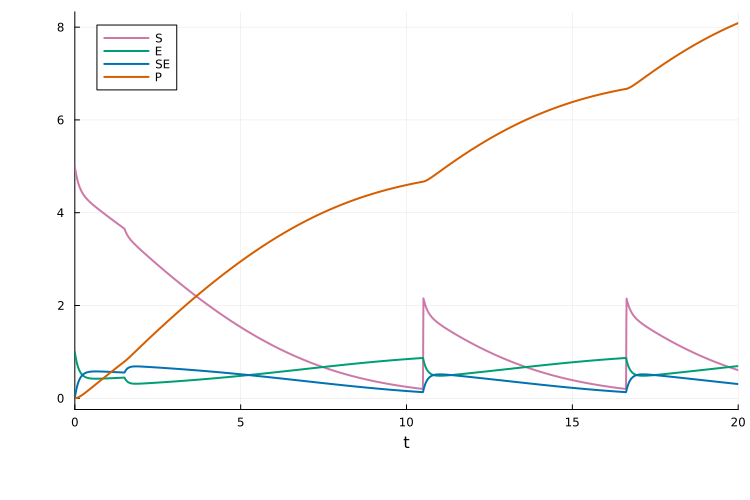
Simulation condition specific events
An event can be made specific to a simulation condition via the condition_ids keyword. For example, assume two simulation conditions:
cond1 = PEtabCondition(:cond1, :S => 5.0)
cond2 = PEtabCondition(:cond2, :S => 2.0)
simulation_conditions = [cond1, cond2]
measurements = DataFrame(
    simulation_id=["cond1", "cond1", "cond2", "cond2"],
    obs_id=["obs_P", "obs_Sum", "obs_P", "obs_Sum"],
    time=[1.0, 10.0, 1.0, 20.0],
    measurement=[0.7, 0.1, 1.0, 1.5]
)
And that the event should only triggered in the second condition:
event = PEtabEvent(t == 2.0, :S => 3.0; condition_ids = [:cond2])PEtabEvent when t == 2.0: S => 3.0From plotting the solution, the event clearly only triggers in :cond2:
model = PEtabModel(
    rn, observables, measurements, pest; events=event,
    simulation_conditions = simulation_conditions
)
petab_prob = PEtabODEProblem(model)

sol_cond1 = get_odesol(x, petab_prob; condition = :cond1)
sol_cond2 = get_odesol(x, petab_prob; condition = :cond2)
p1 = plot(sol_cond1, title = "cond1")
p2 = plot(sol_cond2, title = "cond2")
plot(p1, p2)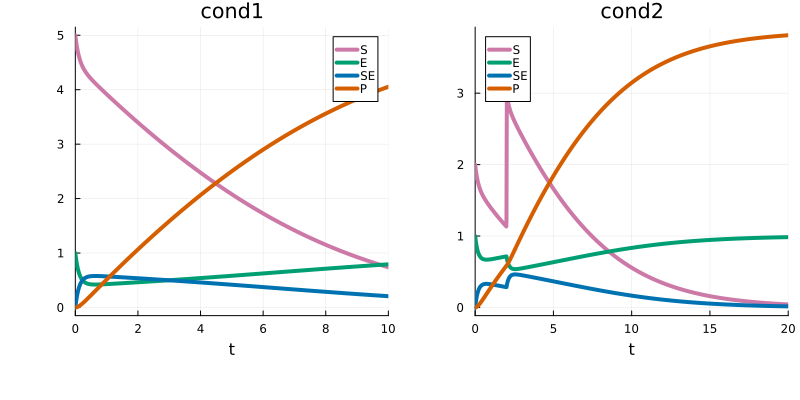
References
- F. Fröhlich, F. J. Theis, J. O. Rädler and J. Hasenauer. Parameter estimation for dynamical systems with discrete events and logical operations. Bioinformatics 33, 1049–1056 (2017).